


EdgeWave iPrism Features & Benefits
iPrism Offers Comprehensive Web Security
Overview:
Exclusive Transparent Bridge Mode Deployment
iPrism's standard deployment and proprietary port-agnostic, kernel-level filtering combine the accuracy and security of pass-through filters with the speed and coverage of a pass-by or sniffer-type solutions, giving you the best web filtering software and hardware combination.
Learn More
iGuard Database with iPrism Automated Rating Protocol (iARP)
The iPrism web content filtering software includes 100% human-reviewed iGuard database with the iARP feature, which further refines Web filtering by sending your most frequently-accessed unrated URLs to the iGuard team automatically to be added to your and all our customers' database
Learn More
Exclusive iPrism Hybrid Remote Filtering
iPrism's new remote Web content filtering software combines with iPrism hardware and SaaS technology to extend comprehensive, flexible Web security to your corporate laptop and other remote or roaming users. iPrism's exclusive hybrid technology makes remote filtering hassle-free with Web filtering software and hardware that makes deployment simple and seamless.
Learn More
Outbound Anti-Botnet and Inbound Antivirus Protection
iPrism Web Security provides continuous defense against dangerous botnets by leveraging botnet threat databases and indexes that are continuously updated with iPrism's botnet Web filtering software. For business, this provides multi-layered protection.
Learn More
Centralized, Multi-User Admin and Reporting with Granular Override Management and SSO
iPrism makes IT hassle-free, with Web filtering software flexibility that lets you define roles for policies, reports, and other facets of administration with eight pre-defined and customizable roles that you can delegate to any person within the organization (local or authenticated users).
Application Controls
iPrism Web filtering software / hardware technology offers application controls that reduce the risks associated with unsanctioned application communications.
Learn More
Enhanced Directory Integration
Unlike some competitors, iPrism is the best web filtering software for business because it employs on-box user authentication rather than user identification giving you significant advantages.
iPrism iLearn Center - Embedded Video Tutorials
The iPrism iLearn Center offers exclusive video tutorials that are embedded in the new iPrism user interface. This enhanced user support feature allows you to manage your Web filtering software configuration and policy settings on-the-fly, shaving hours off the time you spend on IT administration tasks.
Seamless Terminal Server Integration
iPrism is the only Citrix Ready appliance-based Web Filtering software solution on the market, assuring consistent policy application whether your users are Web surfing from their desktops or via Citrix or other terminal server systems.
Learn More
Comprehensive Logging, Real-Time Monitoring and Reporting On-Box
iPrism's comprehensive on-box reporting requires no additional web filtering software or hardware and includes real-time monitoring and email alerts that give you highly accurate and timely visibility on Internet activity across your organization.
Learn More
If you have multiple iPrisms deployed across your large enterprise and distributed network, the iPrism Enterprise Reporting Server (ERS) delivers comprehensive aggregate reports on all Web activity quickly and easily.
Circumvention Defense Network (CDN)
iPrism Web content filtering software and hardware solution has the unique CDN, which protects your organization from circumvention attempts by gathering intelligence on thousands of externally-hosted non-Web servers used to circumvent your network security. The CDN includes dynamic proxy detection and areal-time anonymizer defense
Learn More
EdgeWave h-Series Appliances
iPrism Web filtering software combines with a powerful line of high-performance hardware in a full range of appliances designed to deliver optimum performance and blazing Web security throughput speeds to organizations of all sizes no matter how big your pipeline.
Learn More
Flexible Administration:
In accordance with our goal to keep daily administrative requirements to a minimum, our Web security solution gives IT professionals unrivalled flexibility in managing their resources with the Admin Roles feature. Using the browser-based central management console, IT Managers can easily share administrative tasks by assigning a wide range of roles and privileges to others in their department or the company. Choose from eight pre-defined, customizable roles or create new roles to suit your specific requirements. You can also restrict privileges to managing or reporting on specific users or networks and accountability is assured by using administrator logs to audit system configuration changes in real-time.
Benefits of iPrism's Multiple Administration Roles:
- Allows you to more efficiently manage your IT department and resources by delegating administrative tasks
- Enhances our already low TCO by providing superior flexibility in distributing and managing roles and tasks
- Assures that you maintain the security level of your department when you assign roles by authenticating per directory service group membership or via locally defined credentials
iPrism's Exclusive Override Delegation Feature
iPrism Web Security offers a highly granular override management feature that no one else in the industry offers. It allows administrators to address end-users' override requests by delegating override privileges to a secondary administrator or even providing self-override roles to some end-users. This should be welcome relief to IT administrators who must deal with repetitive requests from multiple users going to the same blocked page or individual users going to multiple blocked pages.
The benefits of override granularity and enhancement include:
- Streamlines the time-consuming task of fulfilling override requests
- Allows you to delegate override privileges to others in your organization, even non-IT personnel
- New enhancements offer more override duration options and enable overrides that allow time-limited access per a different user's profile.
- Teachers who may want to apply their profile categories to students as they work on a particular assignment.
- Business departments that require temporary access to content that might be blocked normally.
- HR or Legal departments engaged in special projects.
- However you choose to delegate roles, you maintain override control with the ability to lock website categories from being overridden, monitor and revoke active overrides in real-time or report on overridden access
iLearn Videos for Instant Assistance
iPrism includes a series of integrated, on-demand instructional videos designed to help administrators navigate basic Web Filtering features. We know IT Administrators are busy and don't always have time to consult a manual or knowledgebase to complete simple Web filtering tasks. Whether you are new to iPrism Web Security, or just need a quick refresh on a configuration task, the short 3-5 minute iLearn Center video tutorials are designed to quickly walk you through completing common functions, step-by-step without searching through a database or downloading additional materials.
Transparent Authentication:
iPrism makes authentication easy with transparent methodology that allows you to delegate administration roles via group membership to privileges mapping, and have visibility into, manage and enforce user policies via group membership to profiles mapping.
Active Directory & "Auto-Login"
iPrism Web Security supports Microsoft Active Directory (AD) services running on Windows Server 2000, 2003 or 2008. Unlike transparent agent-based user identification methods, Windows or Mac users' identity is not only transparently obtained, but authenticated in real-time, using a secure Microsoft protocol when they are logged into a domain or other realm trusted by iPrism Web Security's configured AD domain controller. iPrism supports redundant domain controllers, one-way outgoing domain trust and hierarchal nested groups.
iPrism's Auto-Login feature uses Kerberos as the primary authentication protocol with NTLMv2 as a backup, which enables the client browsers to respond to authentication requests with no intervention by the user. Many competitors only use NTLMv2, or even NTLMv1 in some deployments, as their primary protocol, which is not recommended by Microsoft.
On-box Kerberos Authentication:
- Is recommended by Microsoft
- Uses a "trusted 3rd-party" schema, which is the already trusted domain controller (DC), so it complies with Microsoft best security practices without domain controller changes
- Is the least noisy protocol because iPrism doesn't need to challenge the client and pass this information to the DC every time, and does not use insecure NetBios requests
- Is independent of operating systems maintenance or upgradeability concerns, including specific versions or patches, because it doesn't require a separate server to host agents, or client agents on every managed workstation
Mac OSX Client Auto-Login
Mac OSX 10.4/10.5/10.6 clients can also take advantage of iPrism's Auto-Login feature. With Active Directory services running on Windows Server 2003 or 2008, you can achieve authentication by binding the clients to the same domain controller as the iPrism Web Security solution using the Directory Utility. If you do not wish to bind, you can take advantage of Safari browsers' locally cached credentials after a one-time prompt to the user.
Session-Based Authentication & Proxy Mode
Unique "session-based" authentication method enables auto-login for multi-user workstation environments such as Citrix or Microsoft Terminal Services. Users are allowed to maintain their productivity without incessant authentication requests, while administrators do not need to install agent software on servers, ensuring that uniform user-based policy enforcement is being enabled across your organization.
Novell eDirectory Support
iPrism Web Security supports Auto-Login feature when using Novell eDirectory as the LDAP server and Novell login clients on user machines.
LDAP Support, Captive Portal & Local Users
iPrism Web Security supports manual login feature via captive portal or basic authentication when using a LDAP v1/2/3 compliant directory service, including Mac OSX Server Open Directory or OpenLDAP, or Local Users.
In some multi-user workstation environments, it may be preferable to explicitly request users' credentials by presenting a customizable authentication page via a captive portal. Optionally, this page can be sent over secure SSL-encrypted traffic.
For guests or delegated administrators who do not have user accounts defined in an existing domain group, iPrism Web Security allows you to locally-define a local user's credentials.
iLearn Center:
iPrism Web Security already saves IT Administrators over 500 hours over other leading Web security solutions, and now with the exclusive iLearn Center we've found a way to save you even more time on Web Filtering tasks. The iLearn Center consists of a series of on-demand instructional videos designed to help adminstrators navigate basic Web Filtering features. We know IT Administrators are busy and don't always have time to consult a manual or knowledgebase to complete simple Web filtering tasks. Whether you are new to iPrism Web Security, or just need a quick refresh on a configuration task, the short 3-5 minute iLearn Center video tutorials are designed to quickly walk you through completing common functions, step-by-step without searching through a database or downloading additional materials.
Fully integrated
iLearn video tutorials, with useful help text, link directly from the relevant product pages and launch automatically to quickly demonstrate the feature you wish to learn about. This enhanced user support tool allows IT Administrators to manage configuration and policy settings on-the-fly, without having to log out of the interface.
Learn from the experts
iLearn Center instructional videos were created by our product experts and demonstrate the best practices for both basic and custom configuration of your iPrism Web Filtering appliance. Useful tips and tricks included in the videos, along with recommendations for related content, help you get up and running quickly with iPrism Web Security.
Save time
Basic Web filtering tasks shouldn't be time-consuming. iPrism Web Security with iLearn simplifies Web filtering management and saves you time. We started with the most-frequently used iPrism features and incorporated feedback from our customers to design task-oriented tutorials that quickly demonstrate the steps necessary to complete a specific function, without adding extraneous content
TCO Advantage:
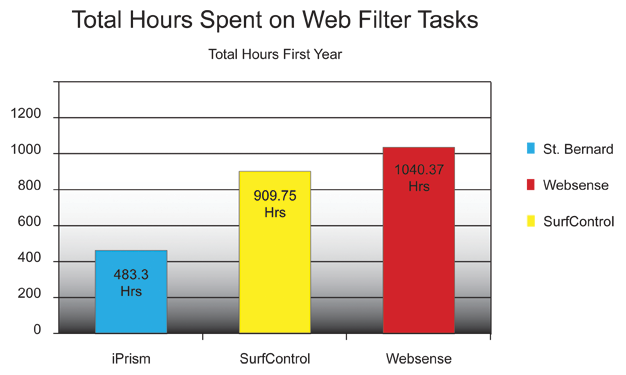
iPrism Users spend 50% less time on Web Filtering compared to Websense and SurfControl
A new study by independent research consultants Robert Hale and Associates found that iPrism Web Filter users spend one-half the time spent by Websense and SurfControl users on their Web filtering tasks. The study results have strong implications for organizations looking to reduce total cost of ownership while maintaining robust network security.
A summary of study findings includes:
- For all companies and all parameters surveyed, Websense and SurfControl customers spent twice as much time in the first year as EdgeWave iPrism users. EdgeWave iPrism users spent an average of 483 hours per year, Websense users spent 1,040 hours and SurfControl users spent 910 hours.
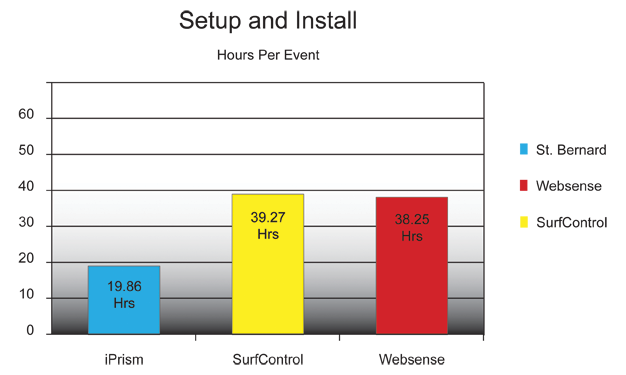
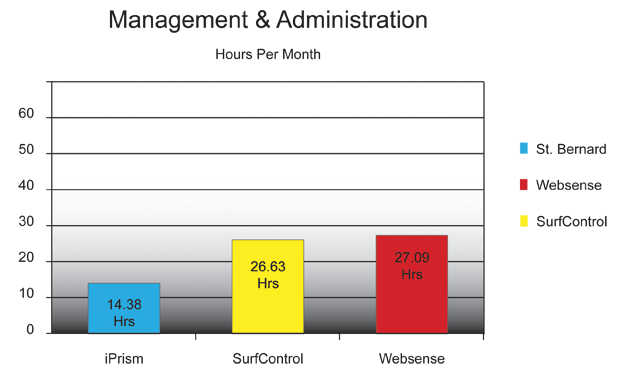
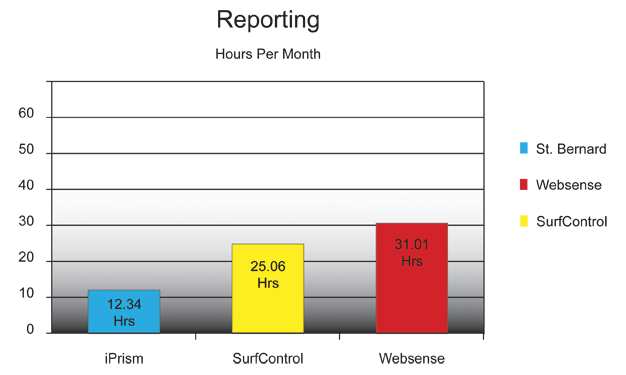
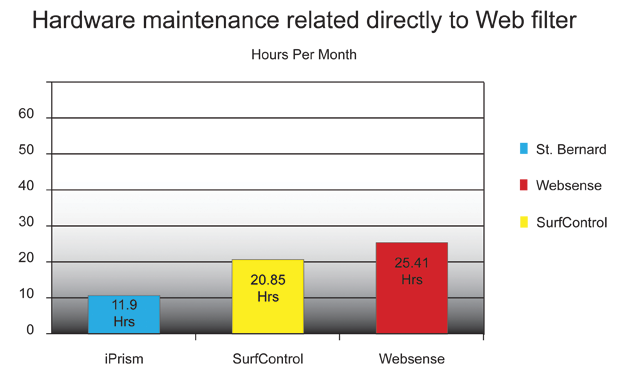
- The dramatic difference in hours spent was across all tasks associated with a Web filter that were measured including set up and installation, management and administration, hardware maintenance and reporting.
- The study found that EdgeWave iPrism users need to re-boot less often then Websense and SurfControl users
- A larger number of Websense and SurfControl customers have switched to iPrism than have iPrism customers switched to either Websense or SurfControl
Why is TCO Important?
When calculating the total cost of ownership (TCO) of any hardware or software product, the acquisition price is just part of the equation. According to a recent Gartner report, TCO can be up to 4.5 times higher than your initial acquisition price. Gartner states that the main variable driving up TCO is labor costs. The good news is that labor costs are actually the most manageable part of the equation. This TCO study shows you how dramatically iPrism cuts the time your IT staff will spend on all tasks associated with web filtering compared to Websense and SurfControl. The difference directly affects your bottom line.
iPrism Cuts TCO Dramatically Across all Tasks
What About TCA?
The study, the first of its kind in North America, measured the costs involved in acquiring a Web filtering solution, analyzing those that extend beyond the initial solution price. These costs can include additional hardware and software required to operate the solution, time spent on integration and others factors. The study found that iPrism TCA is up to 43% lower than the comparable Websense solution for an average 750 seat network.